Tekken 7 PPSSPP: Master the Arena with Unstoppable Moves
Complete guide to playing Tekken on the PPSSPP emulator with optimized 60FPS settings, combo inputs, and high-tier character strategies.
Tekken on PPSSPP: Complete Emulator Setup and Performance Guide
PPSSPP can run the PSP versions of Tekken at higher resolutions on Android, iOS, Windows, macOS and Linux. With the right configuration, Tekken: Dark Resurrection and Tekken 6 retain the fast, responsive combat that makes them worth revisiting while looking considerably sharper than they did on the original 480 × 272 PSP display.
The best setup is not simply the one with the largest resolution number. Tekken depends on stable game speed, predictable frame pacing and low input latency. A fluctuating 4x image is worse for combos and punishment than a locked 2x presentation.
Quick setup: Use Vulkan, set the rendering resolution to 2x or 3x PSP on a modern phone or 4x PSP for approximately 1080p on a capable PC, keep Frame Skipping off, leave Hardware Transform on, disable VSync for lower latency and map each limb to a separate physical button.
Which Tekken Games Work in PPSSPP?
Two full Tekken games were released for PSP:
| Game | Best for | Important differences |
|---|---|---|
| Tekken: Dark Resurrection | Tekken 5-era movement, strong solo content and a compact competitive roster | Includes Arcade Battle, Story Battle, Practice, Tekken Dojo, customization and PSP ad hoc play |
| Tekken 6 | Larger roster, Bound combos, longer wall carry and Tekken 6-era systems | Portable version of Tekken 6 without the full console Scenario Campaign |
Bandai Namco's official Dark Resurrection page confirms that the PSP release includes practice, arcade-style modes, character customization and ad hoc multiplayer. Bandai Namco: Tekken Dark Resurrection
Dark Resurrection is the cleaner choice for players who want a complete handheld package. Tekken 6 is preferable if you want to practise Bound routes, longer juggles and the movement style associated with the sixth main game.
Do not try to load the PS2, PS3, Xbox 360 or arcade editions into PPSSPP. PPSSPP emulates PSP software only.
Use the Current PPSSPP Version
As of October 22, 2026, the current stable release is PPSSPP 1.20.4, released on May 16, 2026. Download it through the official PPSSPP website or an official app store rather than an unknown APK mirror.
PPSSPP is available for:
- Android
- iPhone and iPad
- Windows
- macOS
- Linux
- Other supported platforms listed by the project
The free and Gold versions use the same emulation core. PPSSPP Gold primarily supports development and does not unlock a faster Tekken mode.
What You Need
Before starting, prepare:
- A current PPSSPP installation
- Your own legally obtained PSP game dump
- Sufficient storage for an ISO, CSO or CHD file
- A physical controller if possible
- A device capable of maintaining 100% game speed
Recommended Input Hardware
For serious Tekken play, use one of the following:
- A USB or Bluetooth gamepad
- A PlayStation or Xbox-style controller
- A compatible arcade stick
- A mobile controller grip with a reliable D-pad
Touch controls are usable for Arcade Battle and casual play, but repeated diagonals, simultaneous buttons and Korean Backdash inputs are considerably less consistent on a flat touchscreen.
How to Get Tekken Legally for PPSSPP
PPSSPP does not include commercial games. You must supply a game that you own.
Dumping a PSP UMD
The official PPSSPP process requires:
- A PSP capable of running the required firmware tools
- Your original Tekken UMD
- A USB Mini-B cable
- A computer or device that can copy the disc image
The general workflow is:
- Insert the UMD into the PSP.
- Connect the PSP to the computer over USB.
- Select UMD as USB Device in the relevant PSP menu.
- Open USB Connection on the PSP.
- Copy the exposed ISO file to the computer.
- Rename it clearly, for example
Tekken-6-PSP.iso.
Full instructions are available in the official PPSSPP UMD dumping guide.
Legal note: This guide does not provide ROM or ISO download links. Copyright and personal-backup rules differ by country, so verify the law that applies where you live.
ISO, CSO or CHD?
| Format | Advantages | Considerations |
|---|---|---|
| ISO | Uncompressed and simple to troubleshoot | Uses the most storage |
| CSO | Mature PSP compression with good compatibility | Heavy compression can increase loading work on weak hardware |
| CHD | Modern compression supported by PPSSPP 1.17 and later | Must be created with PSP-compatible DVD mode and sector settings |
Do not leave the game inside a ZIP or RAR archive. Extract the game first or use a format PPSSPP supports directly.
How to Install and Launch Tekken
Android
- Install PPSSPP from the official store or website.
- Create a clearly named folder such as
PSP Games. - Copy your legal ISO, CSO or CHD file into that folder.
- Open PPSSPP.
- Select Browse or Games.
- Grant storage access when Android requests it.
- Open the game folder and select Tekken.
On recent Android versions, choosing a dedicated folder through the system file picker is more reliable than placing games in a protected app directory.
Windows, macOS or Linux
- Download the correct PPSSPP build for your operating system.
- Install it or extract the portable Windows package.
- Open PPSSPP.
- Select Load or browse to the game directory.
- Open your Tekken ISO, CSO or CHD.
Windows users should normally launch the 64-bit build. Windows on ARM devices should use the native ARM64 version where available.
iPhone or iPad
- Install PPSSPP from the App Store where available.
- Save your legally created game image in the Files app.
- Open the file through PPSSPP's browser or import workflow.
- Pair a compatible controller through iOS settings if desired.
File locations and import behaviour can change between iOS releases, so use PPSSPP's current documentation when the game is not visible.
Best PPSSPP Settings for Tekken
Begin with the settings below. Change only one major option at a time and test a full match before making another adjustment.
Recommended Baseline
| PPSSPP setting | Recommended value | Why it matters |
|---|---|---|
| Graphics Backend | Vulkan | PPSSPP's recommended backend on most supported devices |
| Rendering Resolution | 2x or 3x on mobile; 4x on capable desktop hardware | Improves 3D clarity without unnecessary load |
| Frame Skipping | Off | Preserves visual timing and animation readability |
| Auto Frameskip | Off | Prevents constantly changing presentation |
| VSync | Off for lowest latency | Avoids an additional synchronization queue; enable only if tearing is distracting |
| Buffer Graphics Commands | 1 | Good low-latency starting point |
| Hardware Transform | On | Official documentation warns that disabling it is slower |
| Texture Filtering | Auto Max Quality | Respects game behaviour while improving distant texture filtering |
| Anisotropic Filtering | 16x where performance allows | Sharpens surfaces viewed at an angle |
| Texture Scaling | Off initially | Can cause stutter and offers less value than internal resolution |
| Post-processing Shader | Off | Avoids extra latency and GPU work |
| MSAA | Off on mobile; optional 2x or 4x on desktop Vulkan | Smooths edges but increases GPU cost |
| PSP CPU Clock | Auto or 0 | Avoids unnecessary timing changes |
PPSSPP's official graphics documentation recommends Vulkan where available, describes Direct3D 11 as a strong Windows alternative and positions OpenGL as the Android compatibility option. It also notes that 4x rendering is approximately 1080p. PPSSPP graphics settings
Device-Specific Performance Profiles
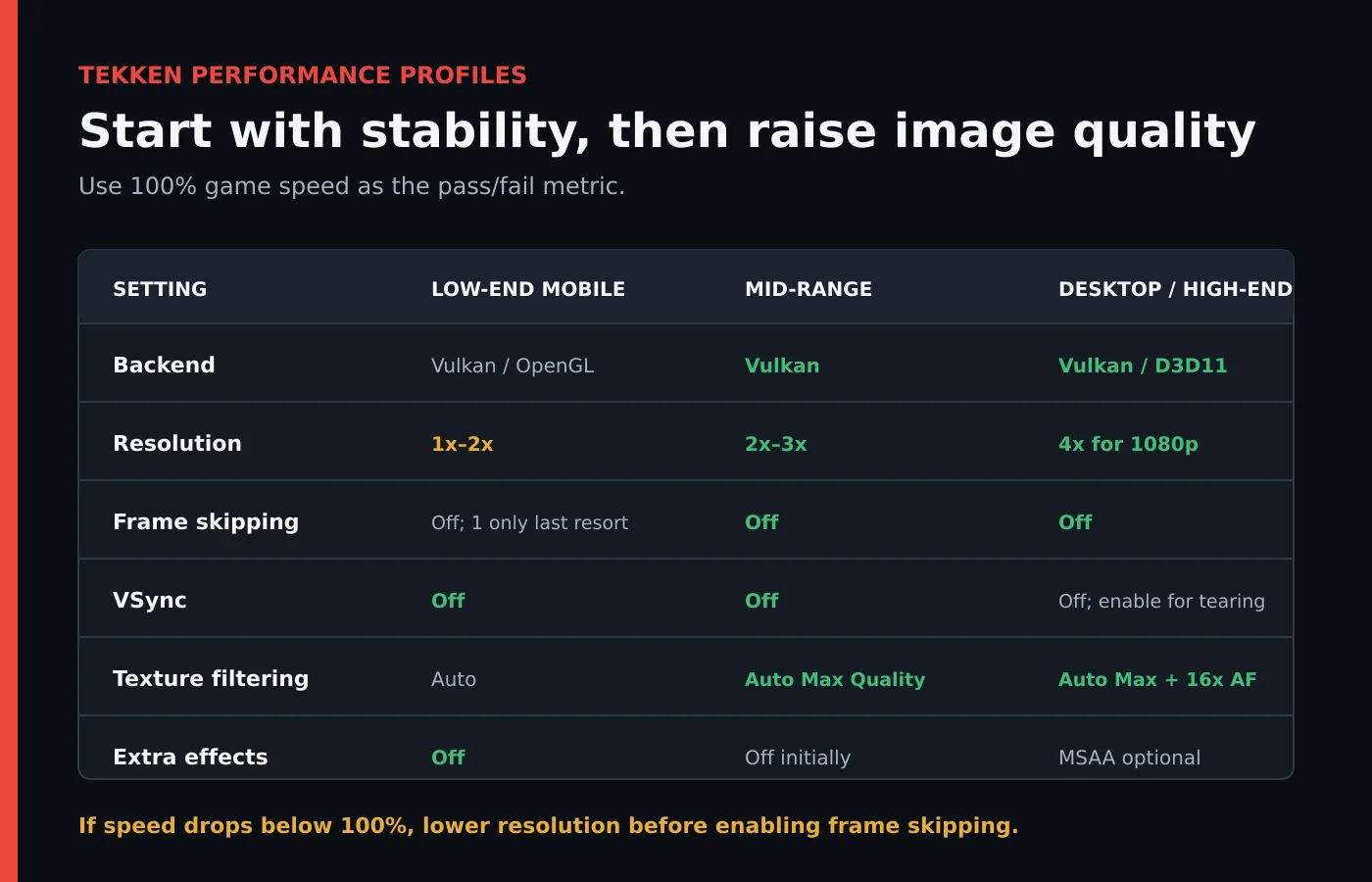
Low-End Android Profile
Use this profile if gameplay drops below full speed or the phone becomes hot quickly:
- Backend: Vulkan; test OpenGL if the driver is unstable
- Rendering Resolution: 1x or 2x PSP
- Frame Skipping: Off initially
- Auto Frameskip: Off
- Texture Filtering: Auto
- Anisotropic Filtering: 2x or 4x
- Texture Scaling: Off
- Post-processing: Off
- MSAA: Off
- VSync: Off
If the game still cannot maintain 100% speed, use Frame Skipping 1 only as a last resort. It may make the counter look smoother while making attack animation and movement harder to read.
Mid-Range Android Profile
- Backend: Vulkan
- Rendering Resolution: 2x or 3x PSP
- Frame Skipping: Off
- Texture Filtering: Auto Max Quality
- Anisotropic Filtering: 8x or 16x
- Texture Scaling: Off
- VSync: Off
- Buffer Graphics Commands: 1
Start at 2x, play several different stages and then try 3x. A training stage is not always representative of a stage with more complex backgrounds.
High-End Android or Handheld Profile
- Backend: Vulkan
- Rendering Resolution: 3x or 4x PSP
- Frame Skipping: Off
- Texture Filtering: Auto Max Quality
- Anisotropic Filtering: 16x
- Texture Scaling: Off or 2x only after testing
- VSync: Off unless tearing is visible
- Buffer Graphics Commands: 1
Do not treat a powerful processor as immunity from thermal throttling. A phone can run 4x perfectly for five minutes and then slow down after sustained heat builds up.
Windows or Desktop Profile
- Backend: Vulkan
- Alternative backend: Direct3D 11 on Windows
- Rendering Resolution: 4x for a 1080p display
- Frame Skipping: Off
- Texture Filtering: Auto Max Quality
- Anisotropic Filtering: 16x
- MSAA: 2x or 4x if supported and stable
- VSync: Off for lower latency; enable if tearing is unacceptable
- Buffer Graphics Commands: 1 or No buffer after testing
At 1440p or 4K, raise the rendering resolution only after confirming that game speed remains locked during effects-heavy stages.
How to Measure Performance Correctly
Enable PPSSPP's performance overlay temporarily while testing.
Pay attention to:
- Game speed: It should remain at 100%.
- Frame rate: Tekken battles target a fast 60-frame presentation.
- Frame pacing: Movement should look even rather than alternating between smooth and jerky.
- Audio: Crackling can indicate that emulation is falling behind.
- Device temperature: Sustained heat can reduce performance later in a session.
A reported 60 FPS does not guarantee correct gameplay when emulation speed is below 100%. Game speed is the more important pass/fail value.
Correct Optimization Order
When Tekken slows down, change settings in this order:
- Lower rendering resolution by one step.
- Disable MSAA.
- Disable texture scaling and post-processing.
- Close overlays, screen recorders and background apps.
- Try another supported graphics backend.
- Test Software Skinning in both states.
- Use Frame Skipping 1 only if the device still cannot reach full speed.
Avoid stacking several undocumented speed hacks. PPSSPP warns that options such as Skip Buffer Effects can cause missing effects, severe visual artifacts or flickering.
Reducing Input Latency
Fighting games expose delay more clearly than most genres. Even one or two additional frames can affect punishment, throw breaking and movement timing.
PPSSPP's official low-latency recommendations include:
- Use Vulkan.
- Set Buffer Graphics Commands to 1 or test No buffer.
- Turn VSync off.
- Experiment carefully with Force Real Clock Sync.
Use No buffer only when the device has enough performance headroom. A more aggressive latency setting can make performance worse if the CPU and GPU can no longer work efficiently in parallel. See PPSSPP's recommended settings.
Controller Latency Tips
- Prefer USB on PC when convenient.
- Use a modern Bluetooth controller and keep it close to the device.
- Disable television motion smoothing and select Game Mode when outputting to a TV.
- Avoid Bluetooth audio if it makes sound noticeably lag behind the action.
- Map attacks directly instead of routing them through third-party macro software.
- Keep the display at its native refresh rate.
Best Tekken Controller Layout
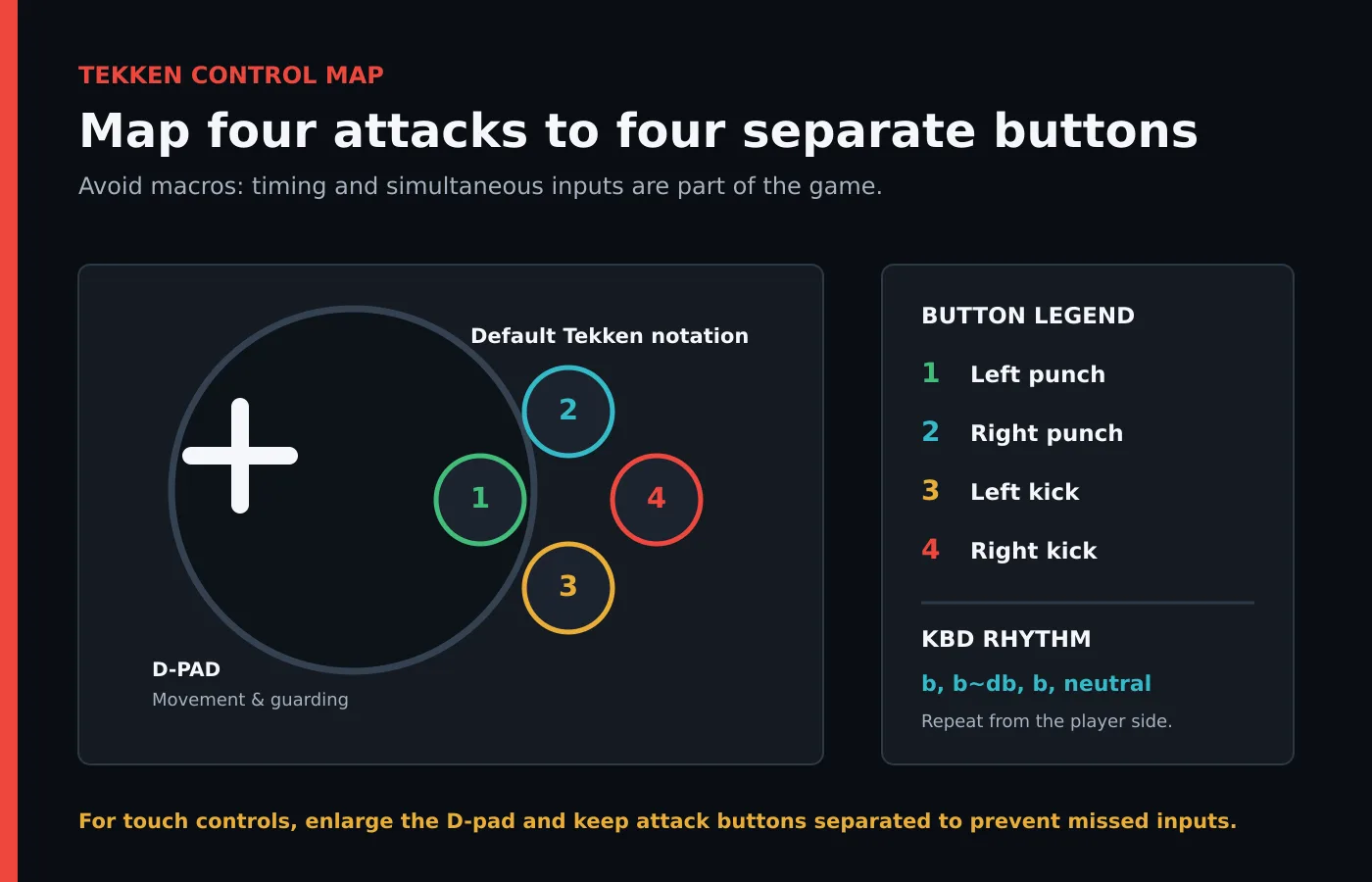
Tekken uses four main attack buttons, one for each limb:
| Tekken notation | Default PlayStation button | Action |
|---|---|---|
| 1 | Square | Left punch |
| 2 | Triangle | Right punch |
| 3 | Cross | Left kick |
| 4 | Circle | Right kick |
In PPSSPP, open Settings → Controls → Control Mapping and assign every PSP button to the corresponding physical control.
Recommended principles:
- Keep 1, 2, 3 and 4 on four separate face buttons.
- Use the D-pad for precise back, down-back and crouch-dash inputs.
- Map Start and Select somewhere accessible but away from the attack buttons.
- Avoid analog-to-D-pad conversion unless your controller's D-pad is unusable.
- Test simultaneous inputs such as 1+2, 3+4 and 1+4.
Touch-Control Layout
For touch controls:
- Increase the D-pad size.
- Move the attack buttons far enough apart to prevent accidental presses.
- Keep opacity high enough that your thumb position remains visible.
- Avoid placing buttons near Android or iOS gesture zones.
- Create a separate layout specifically for Tekken.
Do not overlap two attacks to create an invisible macro region unless you are playing casually. It can make individual buttons unreliable and does not reproduce the timing of a physical controller.
Foundational Tekken Mechanics
Good emulator settings remove technical obstacles, but they do not replace the fundamentals of Tekken.
Frame Advantage and Punishment
Every attack has startup, active and recovery frames. When an unsafe move leaves the opponent unable to block for long enough, answer with a punish that starts within that window.
A standing 1 jab is commonly a 10-frame check in these Tekken systems, but it is not automatically every character's best punish. Use Practice Mode to confirm:
- Your character's fastest standing punish
- Your fastest while-standing punish
- The damage and range of each option
- Whether the opponent can block after the tested move
Begin with a reliable 10-frame punish, then learn stronger punishers for larger disadvantages.
Korean Backdash
Korean Backdash, commonly abbreviated KBD, cancels part of the backdash recovery into crouch and then returns to another backdash.
A simplified rhythm is:
Back, back → down-back → back → neutral → repeat
In Tekken notation this is often written approximately as:
b, b~db, b, n, b~db, b, n...
Practise slowly and watch the character rather than chasing input speed. The goal is controlled separation without remaining crouched or producing an accidental sidestep. Exact execution and effectiveness differ between Dark Resurrection, Tekken 6 and individual characters.
Whiff Punishment
A whiff occurs when an attack misses completely. Create one by:
- Backdashing just outside the opponent's range
- Sidestepping a linear approach
- Interrupting predictable forward movement
- Using a fast retreat after a blocked poke
Respond with a move that reaches the opponent before their recovery ends. A smaller punish that lands consistently is more valuable than a launcher that arrives too late.
Launchers and Juggles
Do not begin by memorizing the longest combo video you can find. Build a stable route with:
- A launcher
- A reliable filler sequence
- A stable ender
- A wall alternative
For Tekken 6, learn where to spend the Bound during the combo. Using it too early may reduce wall carry, while using it too late can make the route unstable.
Wall Carry and Wall Pressure
Before committing to a long juggle, check the stage position. The optimal route changes when a wall is nearby.
- Use forward-moving attacks for wall carry.
- Shorten the combo when a long ender would cause an awkward wall angle.
- Preserve a suitable move for the wall splat.
- Practise both clean and off-axis wall conversions.
- Learn a safe pressure sequence after the opponent gets up.
Movement Before Combos
New players often spend too much time on maximum-damage combos and too little time on neutral play. Prioritize:
- Blocking lows on reaction where possible
- Breaking common throws
- Moving out of predictable pressure
- Punishing unsafe attacks
- Recognizing your best mid and low pokes
- Confirming hits before taking unnecessary risks
Readers exploring other combat-focused titles can also visit HEET's guide to boxing games on PS5. For a broader retro selection that includes fighting games, see the Super Console X Pro games guide.
Save Data, Save States and Replays
PPSSPP supports normal PSP save data and emulator save states.
Use Normal Saves for Long-Term Progress
Normal in-game saves are the safer choice for:
- Character customization
- Arcade progression
- Ghost data
- Options and controller preferences
- Moving progress between compatible PPSSPP installations
Use Save States as Temporary Tools
Save states are useful for quickly repeating a training situation, but they capture emulator state rather than normal game progress.
Avoid relying on them exclusively because:
- States may not remain compatible across every emulator update.
- Loading an old state can overwrite newer in-game progress.
- States created with cheats or unusual settings can behave unpredictably.
Keep regular backup copies of the PPSSPP SAVEDATA directory before moving to another device.
Local and Ad Hoc Multiplayer
The PSP games use ad hoc networking rather than the modern online infrastructure found in current fighting games. PPSSPP can emulate ad hoc multiplayer, but every player should use:
- The same game and region
- The same PPSSPP version
- Compatible network settings
- A stable local network or configured relay
- Matching cheats and gameplay modifications
Test offline performance first. Network delay cannot be diagnosed properly while one device is already failing to maintain full game speed. PPSSPP maintains current information in its multiplayer documentation.
Tekken PPSSPP Troubleshooting
Tekken Runs at 50–55 FPS Instead of Full Speed
- Check whether game speed is below 100%.
- Lower rendering resolution from 4x to 3x or from 3x to 2x.
- Disable MSAA, texture scaling and post-processing.
- Close screen recording and floating overlays.
- Test Vulkan and then OpenGL or Direct3D 11.
- Check whether the device is thermally throttling.
- Keep Frame Skipping off until every other option has been tested.
Audio Crackles During Fights
Crackling usually means the emulator cannot produce audio consistently because game speed is unstable.
- Lower rendering resolution.
- Return Alternative Speed to 100%.
- Close background applications.
- Test a different backend.
- Avoid extremely compressed or damaged game images.
The Game Looks Blurry
- Raise rendering resolution one step.
- Use Auto Max Quality texture filtering.
- Enable anisotropic filtering.
- Confirm that display scaling is not stretching a low-resolution window.
- Avoid aggressive texture filters that smear interface elements.
Thin Lines Appear Around HUD Elements
PSP games were designed for a 480 × 272 screen, and higher internal resolutions can reveal seams in effects or interface elements.
- Reduce rendering resolution.
- Return texture filtering to Auto.
- Disable texture scaling.
- Test another graphics backend.
PPSSPP's graphics documentation identifies thin lines in menus and HUD elements as a possible high-resolution artifact.
The Controller Is Detected but Inputs Are Wrong
- Open Settings → Controls → Control Mapping.
- Clear duplicated or incorrect mappings.
- Map the D-pad and every face button individually.
- Test diagonal directions.
- Check that another controller-mapping application is not intercepting input.
- Restart PPSSPP after reconnecting the controller if necessary.
Combos Drop Despite a Stable Frame Rate
- Confirm game speed remains at 100%.
- Disable VSync and reduce graphics buffering.
- Test a wired controller.
- Check the television's Game Mode.
- Make sure touch buttons do not overlap.
- Practise the route without using save-state slowdowns or Alternative Speed.
PPSSPP Becomes Slow After Several Minutes
This usually indicates mobile thermal throttling rather than a compatibility failure.
- Lower rendering resolution.
- Remove a thick phone case while playing if safe to do so.
- Reduce screen brightness.
- Avoid charging during demanding play sessions.
- Close recording software.
- Let the device cool before testing again.
Frequently Asked Questions
Can PPSSPP Run Tekken 7 or Tekken 8?
No. PPSSPP runs PSP software. Tekken 7 and Tekken 8 were not released for PSP.
Which Tekken Is Best on PPSSPP?
Choose Tekken: Dark Resurrection for its compact Tekken 5-era combat and strong PSP-specific solo content. Choose Tekken 6 for its larger roster, Bound system and longer combo routes.
What Is the Best PPSSPP Backend for Tekken?
Start with Vulkan. Use Direct3D 11 as a strong Windows alternative or OpenGL when an Android Vulkan driver causes graphical problems.
What Rendering Resolution Should I Use?
Use 1x–2x on low-end mobile devices, 2x–3x on mid-range phones and 4x for an approximately 1080p desktop image. The correct setting is the highest value that keeps game speed at 100%.
Should Frame Skipping Be On or Off?
Keep it off. Tekken benefits from consistent animation and frame timing. Use Frame Skipping 1 only as a last resort on hardware that cannot maintain full speed.
Should I Use Texture Scaling?
Leave it off initially. Raising the internal rendering resolution normally provides a cleaner benefit with fewer stutters. Add texture scaling only after performance is already stable.
Does PPSSPP Gold Run Tekken Better?
No. The free and Gold applications use the same emulation technology. Gold is a way to support the project.
Can I Play Tekken PPSSPP Online?
The PSP games support ad hoc multiplayer, which PPSSPP can emulate locally or through supported relay configurations. It is not the same as modern ranked matchmaking or rollback netcode.
Can I Download a Tekken ISO From a ROM Website?
This guide does not recommend unauthorized downloads. Create a personal dump from a game you own and follow the copyright rules in your country.
Why Does Tekken Show 60 FPS but Feel Slow?
Check the game-speed percentage. A frame counter can show rendered frames while emulation is running below its intended speed. Stable 100% game speed is the correct target.
Is a Controller Necessary?
No, but it is strongly recommended. Touch controls make diagonals, simultaneous inputs and repeated movement cancels less reliable.
The best Tekken PPSSPP configuration prioritizes full game speed and low latency over maximum visual settings.
Start with Vulkan, 2x or 3x rendering resolution, Frame Skipping off, VSync off and default accuracy settings. Test a full match, raise the resolution only when performance remains stable and use a physical controller whenever execution matters.
Once the emulator is configured correctly, Tekken: Dark Resurrection remains an excellent portable version of Tekken 5-era combat, while Tekken 6 offers the more combo-heavy Bound system and expanded roster. Both benefit far more from stable timing than from experimental speed hacks or oversized texture filters.