CS2 Crosshair Settings: A Practical Guide to Better Aim
Crosshair placement matters more than copying a professional player’s code. Learn how to build, test and refine a CS2 crosshair.
CS2 Crosshair Settings: A Practical Guide to Better Aim
Quick answer: Crosshair placement matters more than copying a professional player’s code. Learn how to build, test and refine a CS2 crosshair. This guide focuses on practical decisions readers can verify themselves, rather than promising shortcuts or repeating unconfirmed social-media claims.
Search results are crowded with brief answers and recycled advice. The useful question is what you should actually do next, what trade-offs matter and how to check whether the advice still applies. Below is a structured approach for players who want a dependable answer, not just a collection of keywords.
Start with the job your crosshair must do
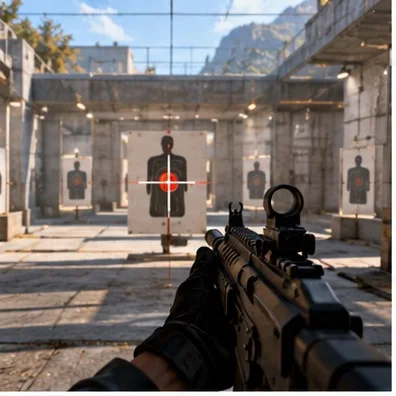
A crosshair is a visual reference, not an aim assist. It should let you identify the centre of your screen while keeping heads and movement readable. A bright crosshair can disappear against bright surfaces, while an oversized one can hide the target you are trying to hit. Judge every adjustment against visibility, precision and comfort rather than popularity.
Choose static or dynamic behaviour
A static crosshair remains consistent when you move and fire, which many competitive players prefer for repeatable head-level placement. Dynamic feedback can help newer players notice movement and accuracy penalties. Neither choice replaces learning when to stop moving before shooting. Test both in a controlled practice session before making a permanent decision.
Set size, gap and thickness deliberately
Small size can help precision at distance, but tiny lines may disappear in hectic fights. Gap controls how much of the target remains visible at the centre; thickness affects contrast. Change only one variable at a time and record the result. A screenshot of your current settings makes reverting easy when an experiment fails.
Colour and outlines depend on the map
Bright green, cyan and other high-contrast colours are common starting points, not universal answers. Walk through several maps and check the crosshair against sky, stone, smoke and dark interiors. An outline can improve contrast but can also add visual clutter. The best setting is the one you can find instantly in actual rounds.
Use a repeatable testing routine
Warm up on stationary targets, then add counter-strafing and moving targets. Track whether your first bullet starts at head height and whether you can see your crosshair during recoil. Do not judge a setting from a single deathmatch. Several short sessions across different maps reveal more than one unusually good or bad match.
Avoid the professional-settings trap
Professional crosshairs are optimized for a particular player, resolution and visual preference. Importing a code can be useful as a baseline, but it is not evidence that the same setup will work for you. Copy the idea, then personalize the size and contrast. Focus on predictable practice habits rather than constant cosmetic changes.
Build head-level habits beyond the menu
Good placement means pre-aiming common angles before an opponent appears. Keep the crosshair near likely head positions as you clear corners and adjust for elevation. Record a demo and pause just before contact to see whether your aim was ready. This often produces bigger improvements than another hour spent changing crosshair colours.
Quick troubleshooting checklist
If the crosshair seems missing, inspect colour contrast, outline and resolution. If you regularly over-flick, review sensitivity and pre-aim habits before blaming the reticle. If sprays feel unpredictable, practice recoil separately. Save one dependable setup and keep it unchanged long enough to build familiarity.
Practical checklist before you finish
Use this three-part test: first, confirm the relevant information in the official game client or publisher documentation. Second, compare the advice with your own goals, hardware, budget or skill level. Third, record what actually changed after you applied it. A clear before-and-after comparison is more valuable than a dramatic claim without evidence.
If you are sharing the guide with friends, include the date you checked the information. Live-service games and digital storefronts change frequently, and an accurate answer today can become incomplete after an update. Whenever a menu, policy or schedule looks different, prioritize the current official interface over screenshots from an older guide.
Frequently asked questions
Is this advice suitable for beginners?
Yes. Begin with the fundamental steps, avoid optional complexity and make one change at a time. Beginners benefit most from predictable routines and clear definitions rather than advanced shortcuts.
Should I trust viral tips or settings?
Treat them as hypotheses to test. Popularity is not proof of accuracy, and an approach that works for one person may depend on their equipment, account, region or preferred playstyle.
How often should I check for updates?
Recheck whenever a relevant game patch, tournament announcement, platform-policy update or significant client change occurs. Avoid claiming that an old screenshot confirms a current feature.