GTA 5 in Browser: How Cloud Streaming & Web Portals Run Without Downloads
Want to play GTA 5 inside a web browser on a low-end PC or school laptop? Here is how cloud streaming portals, WebRTC protocols, and official remote services run the game without local downloads.
Zero Installation: How Cloud Technology Runs GTA 5 Inside Web Browsers
Playing high-end 3D open-world titles once required hefty desktop towers packed with dedicated graphics cards and massive storage drives. However, international search surges for "GTA 5 navegador" highlight a growing demand among players seeking to experience Los Santos directly through internet browsers without downloading 110 GB installation archives.
While running the full PC executable natively inside simple HTML5 JavaScript is mathematically impossible, modern cloud streaming protocols and WebRTC pipelines allow modern browsers to act as high-speed display monitors for remote gaming servers.
Below is an engineering analysis of how browser-based cloud streaming functions, official remote play avenues, and how to spot fraudulent web player scams.
The Technical Mechanism: WebRTC and Video Frame Streaming
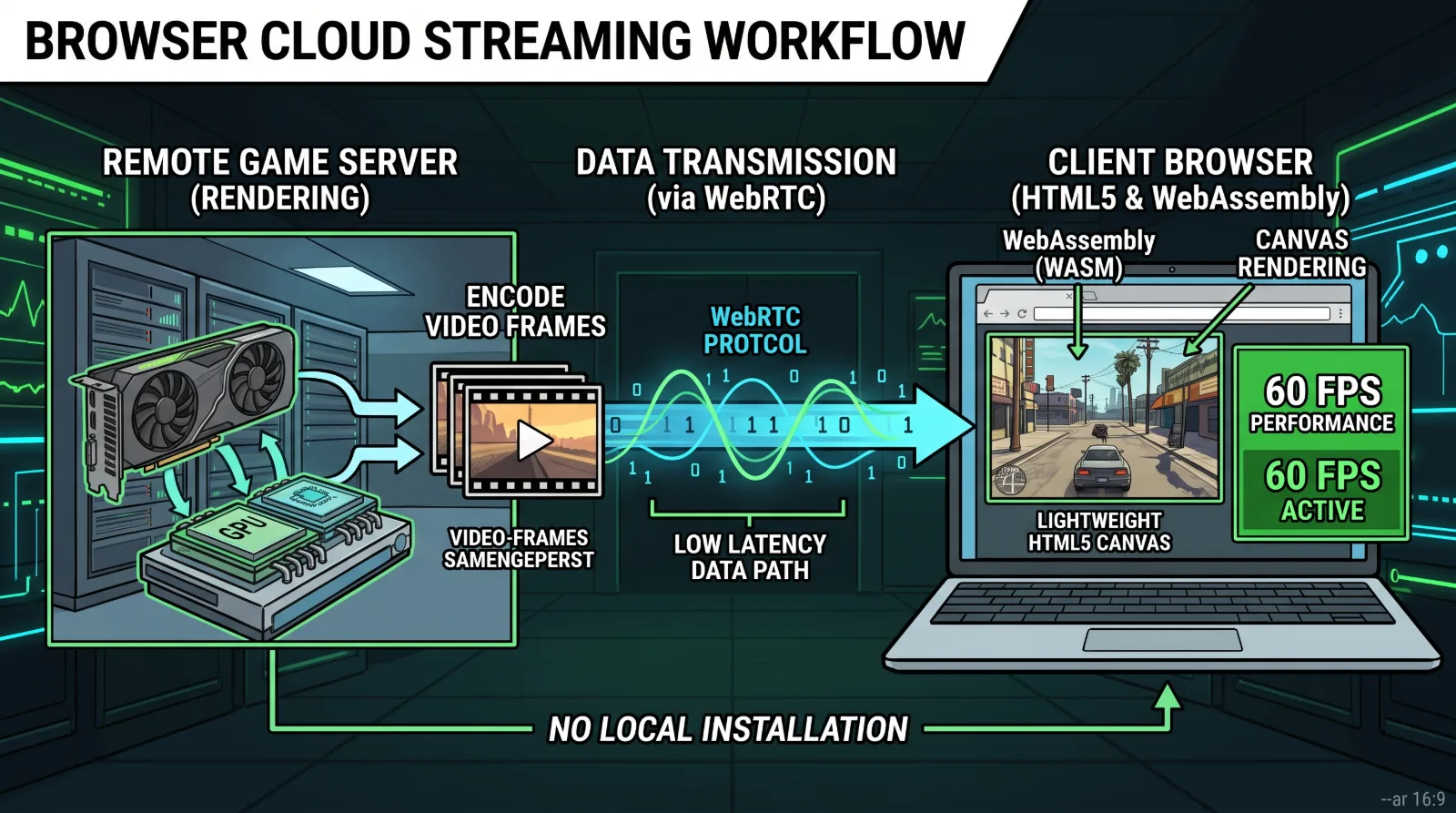
Browser-based gaming operates through server-side virtualization:
- Server-Side Execution: The actual game runs on high-performance server clusters equipped with enterprise graphics hardware miles away.
- Real-Time Video Compression: The output is compressed in real time using low-latency H.264 or AV1 video codecs.
- WebRTC Transmission: Video frames transmit to your web browser window through Web Real-Time Communication (WebRTC) protocols, while your keyboard and mouse inputs upload back to the server in sub-twenty milliseconds.
Verified Methods to Play via Web Browser
Legitimate browser play relies on authorized cloud services:
Authorized Browser Options:
Xbox Cloud Gaming Browser Portal: Subscribers can navigate to xbox.com/play in Google Chrome or Microsoft Edge, plug in any USB controller, and launch supported titles instantly.
GeForce NOW Web Client: Connects your verified Steam or Epic Games library to stream owned PC titles through Chrome on Chromebooks or lightweight laptops.
PlayStation Remote Play Web Interface: Stream your personal PlayStation console directly to portable screens over home Wi-Fi networks.
Warning: Beware of Fake "GTA 5 HTML5" Websites
Many search results promising instant, unauthenticated browser access are malicious scams:
- Malicious Ad Redirects: Sites claiming to run full GTA 5 locally inside a browser window often force users through deceptive survey pop-ups and browser extension installations.
- Network Security Guidelines: Review our essential cybersecurity protocols for digital entertainment by reading our guides.